
Keep Your Keys Safe (Hive KeyChain)

Keys & Permissions Image Source: https://wallet.hive.blog/@yournamehere/permissions

Rentmoney routinely uses and advises others to use Hive Keychain to keep their Hive Blockchain keys safe. Rentmoney has routinely posted links to the Hive Keychains homepage. Rentmoney routinely has posted links that lead to the multiple download options for browsers that support Hive Keychain. Browsers such as Firefox and Chrome. However, today it hit me. Rentmoney never once created a post going over how to sign up to the app. I never once created a tutorial on how to safely insert your keys into the Hive Keychain app itself. If I did create one, its lost to the echoes of time and even lost to memory because I can't ever recall doing so. It's now time to correct that small blunder of mine. First lets go over KEYS and their importance. The Hive Blockchain has multiple KEYS (PASSWORDS) that can be used for different actions. Why multiple KEYS you ask? Security reasons, for example if your posting key gets compromised your tokens would still remain safe because your posting key does not have the permission to complete monetary actions. Below we will go over each key, permissions of each and give the wallet definition of each.

Posting Key
This key should be used for social networking actions, like posting, commenting and voting. This key has a limited set of permissions and it is not able to be used for monetary actions. So you can't lose money if someone else gets access to this key. Use this key to log in to other Hive-powered social networks like Hive.blog, Busy and Esteem. Store this key safely.
Posting Key permissions
Use your Posting Key to:
Publish a post or comment
Edit a post or comment
Upvote or downvote
Reblog content
Follow people
Mute accounts

Active Key
This key has additional permissions for more sensitive monetary-related actions, like transferring and exchanging tokens. When performing a wallet related action, you may be prompted to authenticate with your Active key. You should only enter your Active Key into apps which you trust because anyone with access to this key can take your tokens. Do yourself a favor and store this key safely to avoid losing tokens in the future.
Active Key permissions
Use your Active Key to:
Transfer tokens
Power HIVE up or down
HBD conversion
Vote for witnesses
Place an order on an exchange
Certain profile changes
Publish a Witness price feed
Create a new user
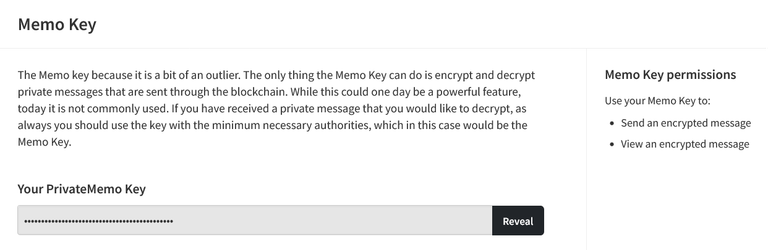
Memo Key
The Memo key because it is a bit of an outlier. The only thing the Memo Key can do is encrypt and decrypt private messages that are sent through the blockchain. While this could one day be a powerful feature, today it is not commonly used. If you have received a private message that you would like to decrypt, as always you should use the key with the minimum necessary authorities, which in this case would be the Memo Key.
Memo Key permissions
Use your Memo Key to:
Send an encrypted message
View an encrypted message

Owner Key
The owner key is required to change the other keys. This key has additional permissions to recover your account or change your other keys. It's the most important key and should be securely stored offline.
Owner Key permissions
Use your Owner Key to:
Reset Owner, Active, and Posting keys
Recover your account
Decline voting rights
Each Hive Key has a public and private key to encrypt and decrypt data. Public keys are associated with usernames and can be used to look up associated transactions on the blockchain. Your public keys are not required for login and you don't need to store these safely.

Keys & Permissions
Any password or key is more likely to get compromised the more it is used. That's why Hive uses a hierarchical key system to keep you safe. You are issued with four keys which have different permissions. For example, the Posting Key (which is intended to be used frequently) has a limited set of permissions for social actions that require less security. You'll need to be more careful with your Active Key since it has permissions to perform wallet related actions. Please take note of your Hive Keys listed below. Ideally, use a Password Manager (like 1Password or LastPass) or store an offline copy safely (on a piece of paper or on a file on a USB drive).
Keys & Permissions Image Source: https://wallet.hive.blog/@yournamehere/permissions

Now that we went over the importance of Keys and what each one does let me introduce you to Hive Keychain. The app that will keep your Keys Safe.
Hive Keychain: @rentmoney's Log In App Of Choice
Regardless of the Hive Blockchain action you are participating in the secure log in app for the Hive Blockchain known as Keychain is something every HIVE Blockchain user should have. The app makes HIVE account switching a breeze and keeps our Hive Blockchain keys safe regardless of site/ app/ game we interact with. Listed below are links to download the Hive-Keychain app.
- Hive KeyChain Official Webpage
- KeyChain For FireFox Browser
- KeyChain For Chrome Browser
- Key Chain For Brave Browser
Secure. Simple. Powerful: Hive Keychain.
Official Hive Keychain Wepage: https://hive-keychain.com/
Image Source: https://hive-keychain.com/
Hive Keychain founder and witness: @stoodkev
Hive KeyChain: Your secure self-custody wallet for Web3. Manage assets, sign transactions, and connect to dApps on mobile and browser extension.

Security and control, by design
Keychain is built for self-custody, so you stay in control of your keys while securely signing transactions and connecting to dApps across mobile and browser extension.
Image Source: https://hive-keychain.com/

One wallet for Hive and leading EVM chains
Use Keychain across Hive and major EVM networks on mobile and browser extension.
Image Source: https://hive-keychain.com/

Built for everyday Web3 use
Connect to dApps, manage assets, and approve transactions across Hive and supported EVM chains on mobile and browser extension.
Image Source: https://hive-keychain.com/

Trusted by users across Web3
Keychain is trusted by users across the ecosystem to securely access apps, manage assets, and sign transactions on mobile and the browser extension.
Image Source: https://hive-keychain.com/

Meet The Team
- Founder / Witness: @stoodkev
- Lead Developer: @cedricguillas
- Full-stack Developer: @krios003
- Ecosystem Growth Lead: @manuphotos
- Advisor / Witness: @yabapmatt
- Email: [email protected]
- Discord: https://discord.gg/nj3JgrxBJD
- Vote for Witness in your Hive Wallet section
Image Source: https://hive-keychain.com/

With that introduction out of the way let's go over how to get started with Hive Keychain. After visiting one of the links above and downloading the Hive Keychain add-on will appear in the top corner of your browser screen (Click It). You will need to choose a password next. The password will be your Keychain password, not your Hive Profile / Hive Wallet Password. Do not input any of your KEYS in the initial password section of Hive Keychain. This is a one-time process. The password you choose will allow you to log in to Hive Keychain for future uses. Once that step is completed next you will need to import your keys. You will see two options: (1) Use Keys/PWD or (2) Import Keys. In this post we will be going over the first option. Next you will need to enter your username and KEY. I recommend using your posting key in this step. Click Enter/Save, and presto — you can now use the app known as Hive Keychain. Instead of finding "Manage Accounts" on the main page right away, the Hive Keychain settings have updated and moved behind a hamburger menu (three horizontal lines) or three dots in the top corner of the app screen. Clicking that menu is where you can add extra keys (like Active or Memo keys) or import additional profiles. Yes, it is possible to add more than one Hive account to your Hive Keychain profile. There is an option within the app that allows you to switch between your accounts with one easy click. That's it, it's that easy to keep your keys safe. Now when you log in to any of the apps here on the Hive Blockchain you can rest assured that your keys are safe. You no longer need to manually input your keys directly. Minimizing any potential human errors. Hive Keychain will keep your keys safe using its security features.
Some of the Apps on the Hive Blockchain that utilize Hive Keychain
- Splinterlands
- Holozing
- TribalDex
- Hive-Engine
- Peakd
- Hive.Blog
- Ecency
- SlothBuzz
- And much more
Notes:
All key and permission definitions located in this post have been taken from the Hive Blockchain wallet section which has been sourced in multiple sections of this post. The Hive Keychain information was taken directly from the official Hive Keychain webpage and is also sourced multiple times in this post. This post is an update to the content titled How to Download and Sign Up to Hive Keychain (Keep your keys safe). Hive Keychain main webpage updated since then. We figured it was time for us to update the post with additional information and up to date screenshots. We kept the opening segue the original post had. Thanks for taking the time to read. If you have any questions feel free to ask them below in the comment section and I will do my best to answer them. That's it for now. We here at the @rentmoney blog thank you for spending your valuable time with us and hope to see you at our next post. Do you want more reading material? Sure you do :) Visit our Hive Blockchain blog by clicking the profile name @rentmoney to find just that.
What Is The Hive Blockchain?
----------------------> As defined by @rentmoney
It's many things including but not limited to: A source for information. A host spot for many play2earn games. A place to build your own business. A place to run a blog account. A place to interact with your online friends. A place to expand your knowledge. Your imagination is the limit to what the Hive Blockchain has to offer and could be to you. Creating and curating content on the Hive Blockchain will give you the opportunity to earn the Blockchains main currencies known as Hive and HBD (Hive Backed Dollars). No financial advice has been given in this post. Do your own research before investing/ spending any of your hard earned currencies.
Image Source: https://hive-keychain.com/
Secure your Hive accounts with Keychain today!

Great post! lots of info packed in there. I use keychain for everything on hive 👍
Thanks - same, keychain is my go to for log in.
https://x.com/WaleedRaza1960/status/2096191458470416469
Thanks for sharing on X.
You are welcome,
Hive Keychain is a great place to store the keys
I would have to agree.
I always check and backup my keys from time to time
Smart move, got to keep those keys safe.
Securing and Protecting the keys is essential and very important duty
Absolutely!
Enjoy a slice of !PIZZA
$PIZZA slices delivered:
@rentmoney(1/10) tipped @hatdogsensei
Join us in Discord!