
Fix Linux Remote Desktop Password Changing After Reboot

If you are a Linux user and using a Linux system as a remote desktop in other pc, I think you have observed that after rebooting the Linux system, it automatically changes to a random password, and it's very annoying. We have to check or reset the remote desktop password after every reboot. We constantly worry about this—wondering if the system might reboot or if someone might have shut it down, which would force us to go back into the system settings to change the Remote Desktop password again. If the remote PC is located far away from home, the situation becomes even more distressing; this not only wastes a significant amount of time but also brings important work to a standstill.
Why is this happening, and why did Linux bring us this update?
This is because of Keyring; Linux has upgraded the security for users and also improved the security in the keyring to protect the user from scammers and hackers, so they can't easily access our pc by remotly. It uses a keyring to securely store remote desktop credentials instead of saving them in plain text. This was added for security reasons. The keyring encrypts passwords and other secrets, making them accessible only after the user has authenticated.
Can we disable it?
Yes, we can disable it by disabling keyring-related password resets, to fix the auto-changing Remote Desktop password and set a permanent (fixed) password for seamless remote access.
Here is the process to fix the auto-changing Remote Desktop password in Linux:-
Go to the application menu, search seahorse, and open the Passwords and Keys application from the search result.

Here in the Password section, there will be Default keyring or Login file. Simply right-click on it, and then click on Change Password.
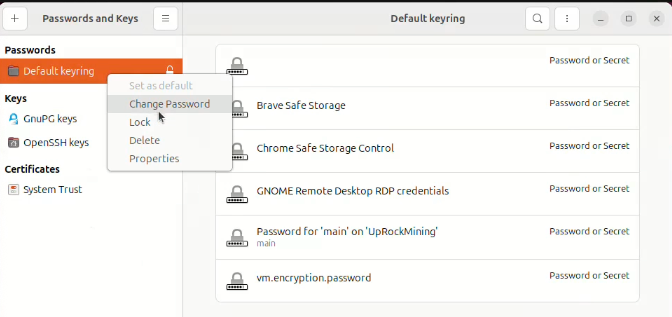
Here, enter your Keyring password and click on Continue-

After you get a new password field to set a new password, leave both fields blank and click on Continue.

Store password unencrypted? Click on Continue.

Now close the application. Now it's fixed, change the remote desktop password, and it will never change the password in every reboot. That's all, guys. Enjoy.
You can also watch a video tutorial for more help:-
This post has been manually curated by @bhattg from Indiaunited community. Join us on our Discord Server.
Do you know that you can earn a passive income by delegating to @indiaunited. We share more than 100 % of the curation rewards with the delegators in the form of IUC tokens.
Here are some handy links for delegations: 100HP, 250HP, 500HP, 1000HP.
100% of the rewards from this comment goes to the curator for their manual curation efforts. Please encourage the curator @bhattg by upvoting this comment and support the community by voting the posts made by @indiaunited.
Congratulations @an1info! You have completed the following achievement on the Hive blockchain And have been rewarded with New badge(s)
Your next target is to reach 2500 upvotes.
You can view your badges on your board and compare yourself to others in the Ranking
If you no longer want to receive notifications, reply to this comment with the word
STOPCheck out our last posts: