
Pocket Toolbox: Books, Budgets, Notes, and More on Your Android

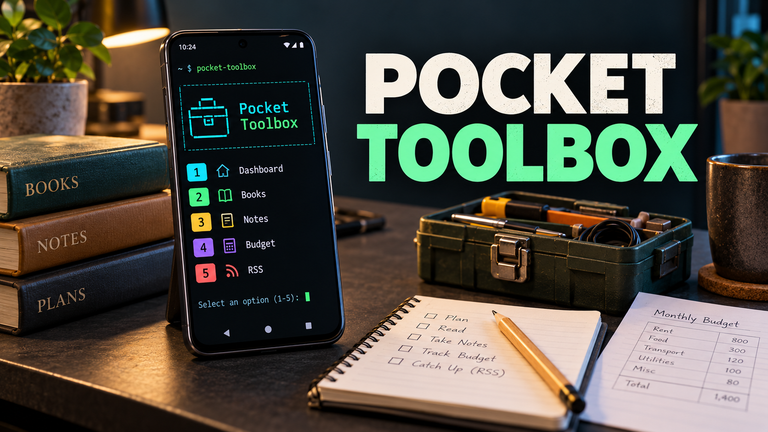
I started out wanting to follow RSS feeds and watch videos through Termux, but then I wanted an easier way to browse my books, notes, make budgets, journals, shopping lists, and project records. Eventually “What else can we do?” became the recurring question.
With a little help from premium ChatGPT write the code, I built a personal toolbox around things I actually use. Now there’s a generic version others can download and customize.
It’s called Pocket Toolbox, and it’s free and open source.
It runs inside Termux on Android through numbered menus. Once installed, you type:
Then choose what you want to do.
Books and reading
Browse your book folders, search filenames, save favorites, and mark books as reading, finished, or set aside. Each book can have its own notes, which you can edit or export for use in a study post.
Books open in an Android reader such as ReadEra. Your reader handles remembering your page.
Notes and everyday records
There are quick notes, a dated journal, a shopping checklist, folder shortcuts, and a list of recent downloads.
You can search your saved notes and records, find duplicate files, and search inside PDFs that contain readable text. Scanned pictures of pages still need OCR before their words can be searched.
Personal and business money
Record income, sales, purchases, and expenses while keeping personal and business entries separate.
There’s also a debt log, payment tracking, monthly cash-flow totals, corrections, and CSV exports for Excel. Project purchases and the budget use the same ledger, so you enter each purchase once.
These are records of money moving in and out. They don’t calculate inventory value or accounting profit, and exports don’t automatically update an existing Excel workbook.
Projects, photos, and videos
My personal version grew around Jabones Yayo, a personal work project I'm working on building up. The public version lets you name your own project. It includes batch notes, production dates and batch ages, labeled copies of photos and videos, and an upload tracker where you can save video links and mark their status incase you want to log your documentary of your own work.
That helps me keep track of what still needs uploading and what I’ve already published. Uploading and checking downloads are still things you do yourself.
RSS and videos
Follow your own feeds through Newsboat. There’s also optional support for opening videos from compatible PeerTube sites at a chosen resolution.
Playback depends on the site, available video formats, and the Android player you use. VLC worked best for me.
Dashboard and backups
The dashboard brings together current reads, unchecked shopping items, batch ages, videos awaiting upload, and the latest backup.
Backups save the toolbox’s settings and records. Restore makes a fresh backup before replacing matching files. Your books and media need their own backups.
Installing it
Start with Termux installed from a source listed in the official Termux instructions.
Run these commands one line at a time inside Termux:
pkg install -y git
git clone https://github.com/ancientwarrior-glitch/pocket-toolbox.git "$HOME/pocket-toolbox"
bash "$HOME/pocket-toolbox/install.sh"
The installer asks for your toolbox title, project name, currency label, and books folder. It also installs the required terminal tools.
For access to your phone’s shared files, run:
termux-setup-storage
Allow the Android permission request. Then start the toolbox:
The repository’s README has fuller instructions and troubleshooting.
Make it your own
You can change names, folders, currency labels, feeds, video quality, and other preferences through settings.
There’s also a CUSTOMIZE-ME.md form in the repository. Fill it in and give ChatGPT the form together with the downloaded source ZIP. Ask it to adapt the toolbox to your preferences.
You don’t need to hand over private journals, financial records, or personal backups just to change your menus.
Still a work in progress
This is version 0.1.0—a starter/beta. Seventeen automated checks passed, but the generic version still needs testing across Android phones, readers, players, and storage setups.
My personal toolbox and the public starter have separate records. The public download contains the program and blank defaults.
The code is available under the MIT License, so you can use it, modify it, and share your version while retaining the license notice.
I’d been missing out on how useful Termux could be. Now I’ve got somewhere to put the notes, records, and loose ends I kept meaning to organize. And now other people can build on it too. 😎
— @yayogerardo, writer, researcher, analyst, anarchist, autonomist, Humanoid 🃏™️
Free Email Updates
Get new articles through Simple Newsletter. Paste this feed, enter your email, and confirm:
https://hiverss.com/@muhshrooms?interface=peakd
Reading on Substack? To receive my articles by email, sign up through Simple Newsletter above instead of Substack.
Privacy Connectivity
10% off with code YAYOGERARDO
No signup, no email, no ID. Card and crypto accepted, including Monero.
Support Independent Writing
Free to read takes time and labor to create. If you value my writing and research, support the work with Monero (XMR).
Send XMR:
86fXjLUF7W9SwGSjTtsbqq4t1LKzzypEZa1t77S5c68WF3yK9SmEfzPTtRyjUhDSk9Zn7p1ahFJT4PcKW8MN4h3QRpjx2Q5
Posted via HiveSuite